

What is a goal tracking tool?
A goal tracking tool is the place a company keeps its goals, and the way it knows whether it’s getting closer to them. At its simplest that’s a spreadsheet with a list of targets and a column for progress; at its most elaborate it’s a platform with cascading objectives, weighted key results, dashboards and integrations with every other system the company runs on. Somewhere between those two is what most leadership teams actually need, which is a shared, current picture of where the company is going, what’s in the way and what’s being done about it.
It helps to be clear about what a goal tracking tool isn’t. It isn’t a personal productivity app, because company goals belong to a team rather than to one person and depend on several people’s work at once; it isn’t a project management tool, because a project tool tracks whether tasks get done rather than whether the company is any closer to the result; and it isn’t a KPI dashboard, because a dashboard tells you a number moved but not what to do about it. A goal tracking tool sits above all of those, holding the handful of outcomes the rest of the work is meant to serve.
I’ve spent a long time watching leadership teams try to track goals, first as a founder and now building Clearahead, and the pattern I see most is that the problem is rarely a lack of data. Most companies have more numbers than they know what to do with, in more tools than anyone can keep track of. What they lack is one picture that everyone trusts, with the reasons behind the numbers next to the numbers, and a rhythm that keeps it current. That’s the job a good goal tracking tool does, and it’s the lens I’ll use for the rest of this guide.
Goal tracking tool or goal tracking software?
The two phrases mean the same thing and people search for both. In this guide I’ve used “tool” throughout, because it’s the word most people use when they start looking; if you want to see how Clearahead itself works as goal tracking software, there’s a page on AI goal tracking software for startup leadership teams, and the feature itself is described under goal tracking.
Why leadership teams use a goal tracking tool
When leadership teams tell me why they’re looking for a goal tracking tool, they rarely say “we need to track our goals”. They say the company feels like it’s pulling in several directions at once, that the weekly meeting is all status and no decisions, that the board pack takes a weekend, or that new hires can’t say what the company is trying to achieve. All of those are the same problem underneath, which is alignment: everyone is working hard, but not on the same thing, and nobody can quite see it until the quarter ends.
That matters more now than it used to. AI has made almost every team faster at execution, so a company can now do a great deal of work very quickly in slightly different directions; the bottleneck has moved from doing the work to agreeing what the work should be, and the leadership team is where that agreement has to happen. I’ve written about this at length in the white paper The plan is the bottleneck, but the short version is that a company moving faster needs a picture of its goals that moves at the same speed.
Here are the four signs I see most often that a company has outgrown whatever it’s using now.
- Sign 1
Every department is busy, and the goal isn’t moving.
Each team is hitting its own targets, but nobody can say whether the company is closer to where it’s trying to get to.
- Sign 2
The weekly meeting is a status update.
Most of the time goes on establishing where things stand, and the decisions get squeezed into the last ten minutes.
- Sign 3
The board pack takes a weekend.
Somebody rebuilds the picture from Slack, spreadsheets and memory every month, and it’s out of date the day it’s sent.
- Sign 4
New hires can’t name the goal.
They know their tasks, but not what the company is trying to achieve this year, or why their work matters to it.
If two or more of those sound familiar, the question isn’t whether you need a goal tracking tool so much as which kind, because, as the rest of this guide shows, tools that look similar on a feature list solve very different problems.
What a good goal tracking tool does
Feature lists for goal tracking tools tend to blur together, because every tool lets you write a goal down, assign it to someone and mark how far along it is. The differences that matter are less visible in a demo and much more visible three months after roll-out, when the question is whether the tool is still being used, still current and still helping the leadership team decide what to do. These are the eight capabilities I’d look for, in roughly the order they matter.
- 01
A home for each company goal.
What you’re aiming for, why it matters, how you’ll know and where it stands today, on one page anyone can read.
- 02
What’s holding each goal back.
An ordered list of the constraints in the way, so the team works on the one that matters most rather than everything at once.
- 03
Moves with owners.
The handful of actions that will clear each constraint, every one with an owner and a date, without becoming a task manager.
- 04
Updates in seconds.
People update in their own words when the work moves, so the picture stays current between meetings and not just before them.
- 05
Evidence and history.
The facts behind each update are kept, so you can see what changed, when and why, instead of relying on memory.
- 06
A weekly summary.
What moved, what’s stuck and what needs a decision, ready for the leadership team before the weekly meeting.
- 07
Roles that match the company.
People who set goals, people who do the work and people who follow along, with the board and investors included at no extra cost.
- 08
Room to change course.
The goal stays steady while the moves change as constraints clear, so the plan keeps pace with what you learn.
The second item is the one most tools leave out, and it’s the one I’d weigh most heavily. Most goal tracking tells you the score, whether that’s a percentage, a traffic light or a key result scored from 0 to 1; very few tell you why the score is what it is. When a goal turns red, the natural response is to add effort, with another initiative, another campaign or another hire, but growing companies are rarely held back by a lack of effort. They’re held back by a few specific constraints, such as trials that stall before a second person joins or a founder who has to approve every decision, and until those are cleared, effort elsewhere is largely wasted. That idea comes from Eli Goldratt’s Theory of Constraints, and I’ve covered it in Remove constraints, don’t add initiatives.
The fourth item, updates in seconds, is the one that decides whether the tool survives. If updating means opening a form, finding the right goal and filling in five fields, it will happen the day before the meeting and not otherwise, and a goal tracking tool that’s only current once a month is just a nicer spreadsheet. The test is simple: can the person who owns a piece of the goal tell the tool what happened in one sentence, as it happens, and trust it to land in the right place?
Types of goal tracking tool, compared
Six quite different kinds of software all describe themselves as goal tracking tools, and most of the confusion in buying one comes from comparing products of different types as if they were the same thing. Each type is built around a different idea of what a goal is for, which decides what it’s good at and where it falls short; the table below sets them out side by side.
| Type | Examples | Built to answer | Best for | Falls short when |
|---|---|---|---|---|
| Spreadsheets and docs | Google Sheets, Excel, Notion | What did we say we’d do? | A founding team writing its first goals | More people need a current picture than update it |
| Project management tools | Asana, Monday, ClickUp, Jira, Linear | Is the work getting done? | Delivery and coordinating detail | You need to know if the work is moving the goal |
| OKR software | Perdoo, Tability, Quantive, Profit.co | Did we hit our key results? | Coordinating many teams | A key result goes red and nobody knows why |
| Performance management | Lattice, Leapsome, 15Five, Culture Amp | How is each person doing? | Reviews and development | Goals are set safely because they feed reviews |
| Operating system tools | Ninety, Bloom Growth | Are we running the system? | Teams committed to EOS | You don’t want the whole methodology |
| Constraint-led tools | Clearahead | What’s holding the goal back? | Leadership teams of growing companies | You need individual reviews or detailed scoring |
Most companies end up with more than one of these, and that’s fine as long as each does its own job: keep the project tool for the doing and the HR platform for reviews, because they’re good at those things. The decision that matters is which tool holds the company’s goals, the one place the leadership team looks each week to decide what matters, and for that the honest answer depends on three things. If you have dozens of teams to coordinate, OKR software earns its keep; if you’ve committed to EOS, the tool built for it will serve you well; and if your goals are clear but keep slipping, and you can’t usually say why, you need a tool that tracks what’s in the way and not just the score.
I’ve gone through each type in more detail, with where each one fits, in types of goal tracking tool, compared, and the two comparisons people ask me about most have their own guides: goal tracking tool vs project management tool and goal tracking tool vs spreadsheet.
Common goal tracking methods
Every goal tracking tool has a method built into it, whether it says so or not. An OKR platform assumes you’ll write objectives and score key results each quarter, an EOS tool assumes rocks and a weekly meeting, and a project tool assumes a goal is the sum of its tasks; so choosing a tool is really choosing a method, and it’s worth knowing the main ones before you look at software.
| Method | What it is | Rhythm | Best for | What it misses |
|---|---|---|---|---|
| SMART goals | A checklist for writing one goal well | When the goal is set | Individual and team targets | How goals connect, and why one is behind |
| OKRs | An objective with three to five measurable key results | Quarterly, with weekly check-ins | Companies with many teams | Why a key result is behind |
| KPIs and scorecards | The numbers that show the health of the business | Weekly or monthly | Spotting change early | Direction: a KPI isn’t a goal |
| EOS rocks | Three to seven quarterly priorities, on or off track | Weekly meeting | Teams running EOS | Anything outside the system |
| 4DX | A wildly important goal with lead and lag measures | Weekly | One focus per team | What to do when the lead measures don’t move the lag |
| Constraint-led | A goal, its ordered constraints and the moves | Weekly, until it’s done | Goals that are clear but keep slipping | Detailed scoring, if a board expects it |
These methods aren’t really rivals, because they answer different questions. SMART is about how you write a single goal, OKRs and rocks are about how you organise many goals, KPIs are about watching the health of the business, 4DX is about weekly focus, and constraint-led tracking is about what stands between you and the goal. Plenty of well-run companies mix them, with a short, memorable company goal, a SMART-style measure underneath it, a scorecard of the numbers they already watch and a weekly look at the constraint that’s holding the goal back.
What I’d avoid is running several of them at full weight at once. I’ve seen startups with company OKRs, department OKRs, a KPI dashboard and individual goals in an HR tool, each updated before a different meeting and none agreeing with the others, and the leadership team ends up spending more time maintaining the system than working on what the system was about. For a company of under a couple of hundred people with a handful of teams, I’d start light and add structure only when you genuinely need it. There’s a fuller comparison in common goal tracking methods, and when each one works, and a deeper look at the two best-known in SMART goals vs OKRs.
Goal tracking pitfalls
Most goal tracking doesn’t fail because of the tool. It fails in a handful of predictable ways, and I see the same eight again and again: a tool full of goals set carefully in January, updated enthusiastically in February and quietly abandoned by April, with the leadership team back to arguing about the picture in the weekly meeting.
- 01
Too many goals.
Forty goals means no priorities. Agree one or two company goals that everyone can name.
- 02
Tracking activity, not outcomes.
A goal at 80% because 80% of the tasks are done hasn’t necessarily moved at all.
- 03
Check-ins that go stale.
Updated the day before the review, the picture is out of date for most of the quarter.
- 04
Company goals tied to reviews.
When goals feed pay and promotion, they get set safely and reported carefully.
- 05
Goals in five places.
The deck, the spreadsheet, the OKR tool and the HR platform all disagree.
- 06
Red with no reason.
A goal turns red and nobody can say what’s in the way, or who’s fixing it.
- 07
Goals nobody can remember.
If a goal needs a baseline, a number, a date and a method to be accurate, people can’t act on it.
- 08
Never changing course.
The offsite plan is treated as fixed, and the team keeps working on moves that stopped mattering.
Look at those together and most of them come from the same mistake, which is treating goal tracking as a reporting job rather than a thinking job. If the point of the tool is to produce a status for the next meeting, people will update it just before the meeting, set goals they can safely report and add more goals whenever someone wants their work to be visible. If the point is to help the leadership team decide what to do next, the tool needs to show what’s holding each goal back, stay current between meetings and stay small enough that everyone can hold it in their head.
The fixes are mostly simple, though none of them are easy: fewer goals, the reason next to the score, updating that takes a sentence, company goals kept separate from individual reviews and a short weekly review instead of a long quarterly one. I’ve set out each pitfall with what to do instead in eight goal tracking pitfalls, and how to avoid them.
How to choose a goal tracking tool
Most goal tracking tools look good in a demo, because a demo shows a tidy company with ten well-written goals, a handful of happy owners and a dashboard full of green. The question isn’t whether the tool looks good with perfect data; it’s whether it will still be used, and still be current, three months after you roll it out to a busy team with messy goals. So before you compare features, answer three questions.
What job does the tool need to do? “Coordinate and score goals across twenty teams” points you to OKR software, “run EOS properly” points you to the tool built for it, and “keep our leadership team aligned on a few big goals and what’s in the way” points you to something lighter. Who will update it, and who will read it? If the people updating it are busy heads of department, it has to take seconds; if the readers include your board and investors, they need a view that doesn’t require training or a seat licence. What method will you use? Choose the method first, because the tool will push you towards its own.
Then take your shortlist through this checklist.
Ten things to check before you choose
- It holds a small number of company goals, each with what you’re aiming for, why it matters and how you’ll know.
- It shows what’s holding each goal back, in order, with an owner for each constraint.
- It tracks the handful of moves that matter, without turning into a task manager.
- Updating takes seconds, in people’s own words, as the work moves.
- It keeps the evidence behind every update.
- The leadership team gets one current picture and a weekly summary of what needs a decision.
- The board, investors and advisers can follow along without paying per seat.
- It works alongside your project, HR and reporting tools rather than replacing them.
- You can change course without rewriting the whole plan.
- You can try it free with a real goal, with no card and no sales call.
A few features sell well and change very little. Elaborate dashboards tend to be admired in the demo and ignored afterwards; five-level goal trees are impressive but mostly create work in a company of under a couple of hundred people; and long lists of integrations matter only if an integration answers a question you actually have. None of these are bad, but none of them will fix a leadership team that isn’t aligned, so don’t let them decide the purchase.
In a demo, the most revealing questions are practical ones. Ask the vendor to show you what happens when a goal goes off track, and where you see why; ask how long an update takes and what the person updating actually does; ask what your board sees and what it costs to add them; and ask how teams that stop using the tool usually stop, which a good vendor will answer honestly. Then trial it properly, for a month, with one real goal and the people who actually own the work. The full checklist, with the questions to ask, is in how to choose a goal tracking tool, and if you want to see how specific products compare, there’s a roundup of the best goal tracking software for startup leadership teams.
Rolling out a goal tracking tool, in four weeks.
Most goal tracking tools are abandoned within a quarter, because they’re rolled out all at once; a slow, deliberate first month is the difference between a tool that sticks and one that quietly goes stale.
- 01
Week 1: one goal, properly.
Set up the most important company goal: what you’re aiming for, why it matters and how you’ll know.
- 02
Week 2: what’s in the way.
Write down what’s holding it back, in order, and invite the people who own the top constraints.
- 03
Week 3: run the meeting from it.
Hold the weekly leadership meeting with the tool on screen: what moved, what’s stuck, what needs a decision.
- 04
Week 4: widen it.
Once the goal is kept current between meetings, add the board as viewers and consider a second goal.
The usual way to roll out a goal tracking tool is to import every goal from the offsite deck, invite the whole company and send an email asking everyone to update their goals by Friday. It feels thorough and it almost always fails, because on day one the tool is full of goals nobody chose to put there, owned by people who weren’t in the room, and the first update request lands as one more admin job in a busy week.
Starting with one goal teaches the team what good looks like. People who arrive to find the company’s goal with the constraint they own already written down, and a note asking whether it’s right, feel included in something that matters rather than handed a form; and the single biggest predictor of whether the tool survives is whether the weekly leadership meeting is run from it, because then keeping it current is simply the easiest way to prepare for the meeting. My guide to running a weekly leadership meeting has a thirty-minute agenda that works well with this.
Free or paid?
If you search for a free goal tracking tool, most of what comes back is built for individuals, with habit trackers and personal goal apps that aren’t designed for a team’s goals. For companies, the free options are spreadsheets and templates, the free tiers of project tools, free plans of dedicated goal tracking tools and free trials of paid ones. A free plan from a dedicated tool is usually the best place for a founding team to start, because it gives you the structure without the cost, and you find out quickly whether the structure helps.
Free plans tend to limit people, goals or features, and for company goals the people limit matters most, because the whole point is that the people doing the work can see and update the goal they’re working towards. It’s worth paying once more people own parts of the goal than the free plan allows, once you have more than one big goal running at once, or once the tool is clearly saving time, such as replacing the monthly board-pack scramble. I’ve compared the options in free goal tracking tools for teams.
A goal tracking tool for your kind of team.
What a goal tracking tool needs to do depends a great deal on who’s using it; a founding team, a head of department and an agency founder all want the same alignment, but they get there in different ways, so each has its own guide.
- Goal tracking tool For leadership teams One picture of the company’s goals, what’s in the way and what needs a decision this week. Read the guide →
- Goal tracking tool For companies Company-wide goals everyone can see, from the board to the newest hire. Read the guide →
- Goal tracking tool For SMEs Light enough for a busy team to keep current, priced for the whole business. Read the guide →
- Goal tracking tool For startups One goal the founding team and early hires can rally behind, free to start. Read the guide →
- Goal tracking tool For departments Department goals that clearly serve the company’s, with cross-team problems owned. Read the guide →
- Goal tracking tool For agencies The agency’s own growth goals, kept in view while client work fills the week. Read the guide →
- Goal tracking tool For business coaches See what moved between sessions in each client’s goals and constraints. Read the guide →
- Who it’s for Who Clearahead is for, and who it isn’t The full picture of the teams Clearahead fits, and the ones it doesn’t. See who it’s for →
How Clearahead approaches goal tracking.
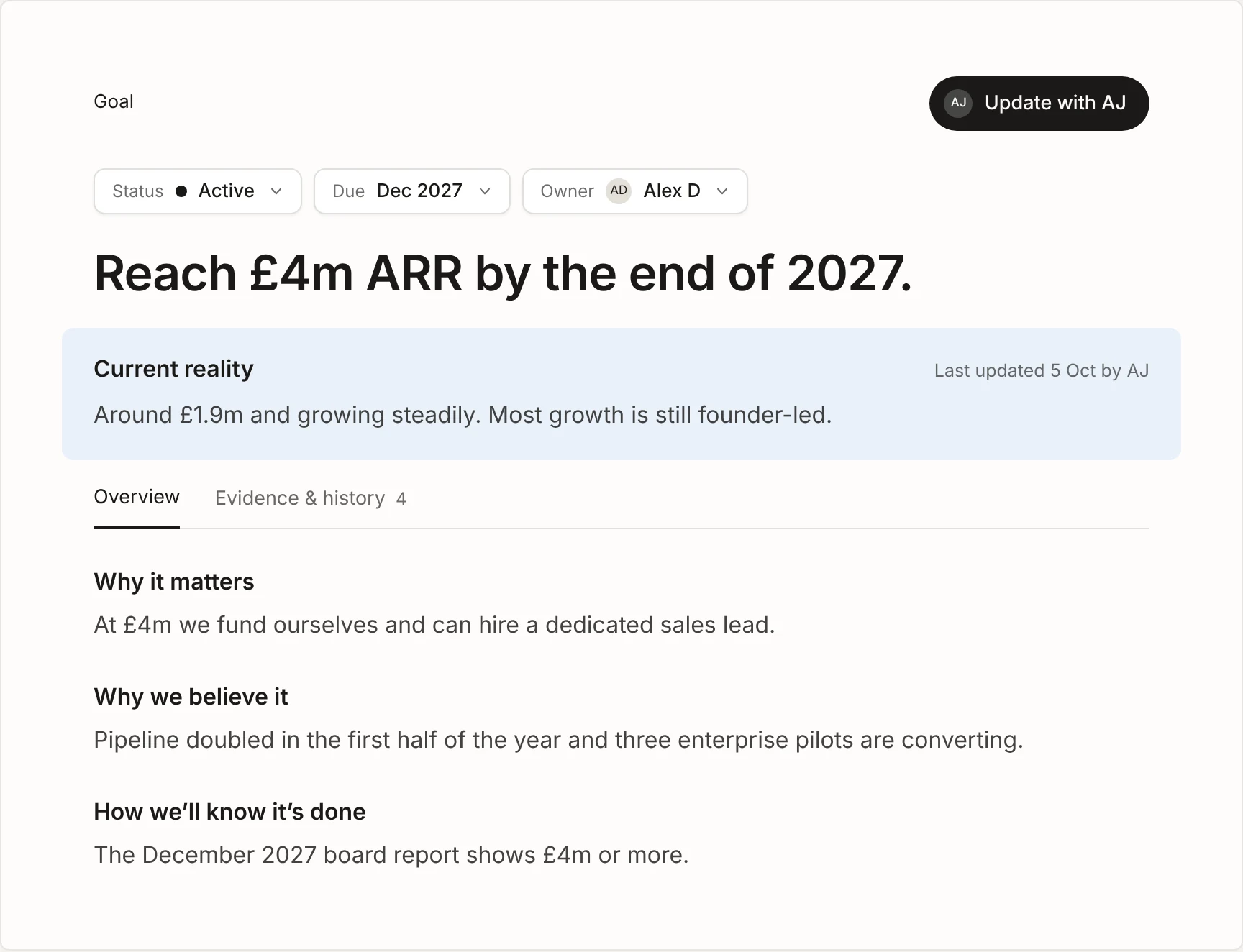
Clearahead is goal tracking for leadership teams who want the whole company pulling in the same direction. You set the long-term goal, find out what’s really standing in the way and agree the moves that clear it; then, as the work happens, Clearahead keeps everyone aligned on where you’re heading, what’s changed and what matters this week.
Every goal, on one page.
What you’re aiming for, why it matters, how you’ll know and where it stands today, in your team’s words.
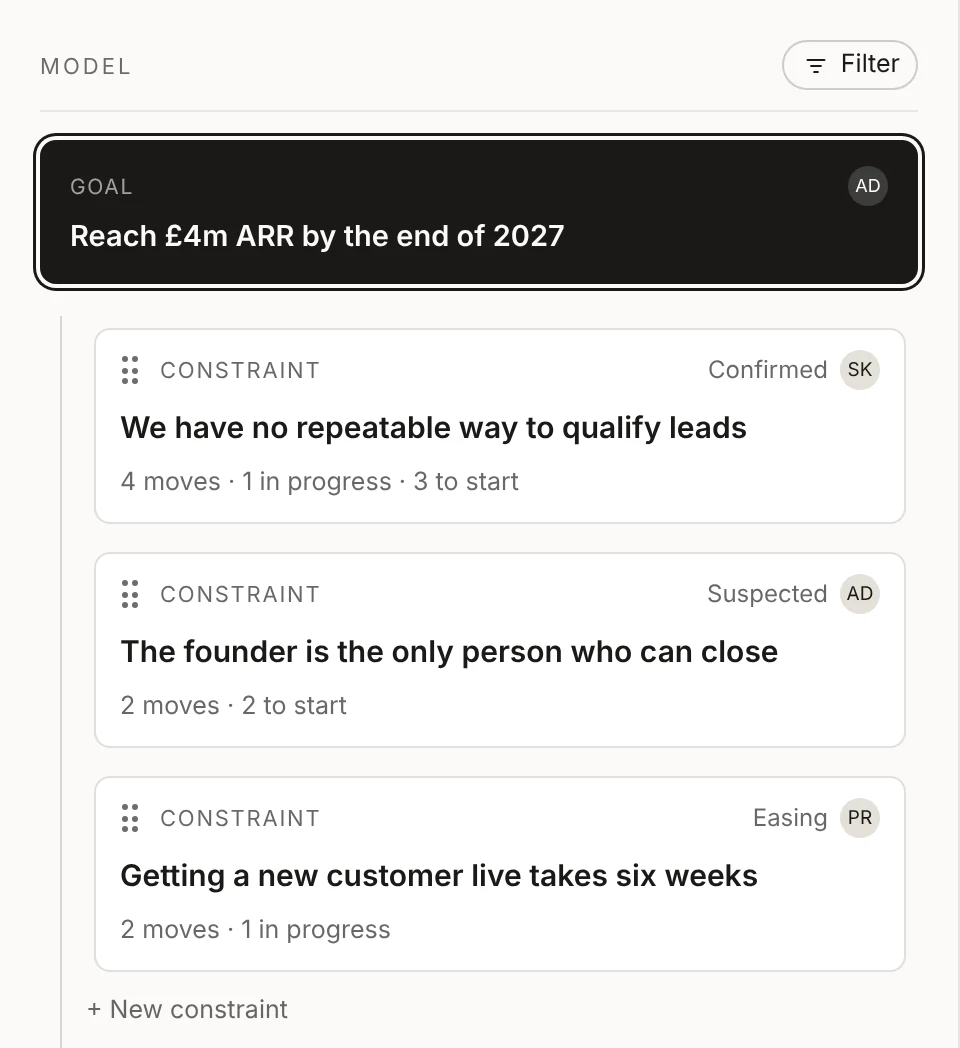
What’s holding it back, in order.
The constraints in the way, each with an owner, so the team works on the one that matters most.
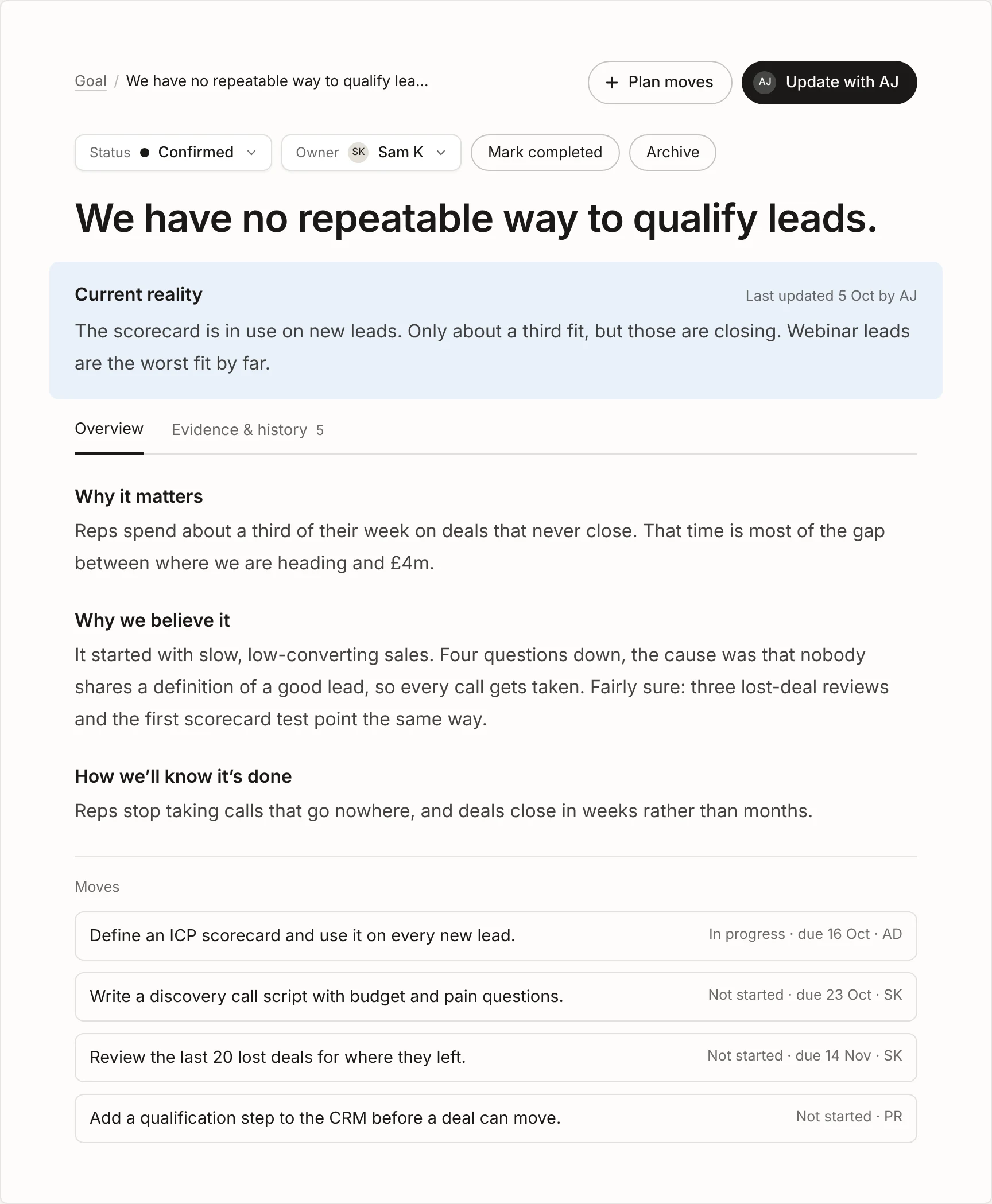
The moves that clear it.
Status, due date and owner on every move, updated in a sentence when the work moves.
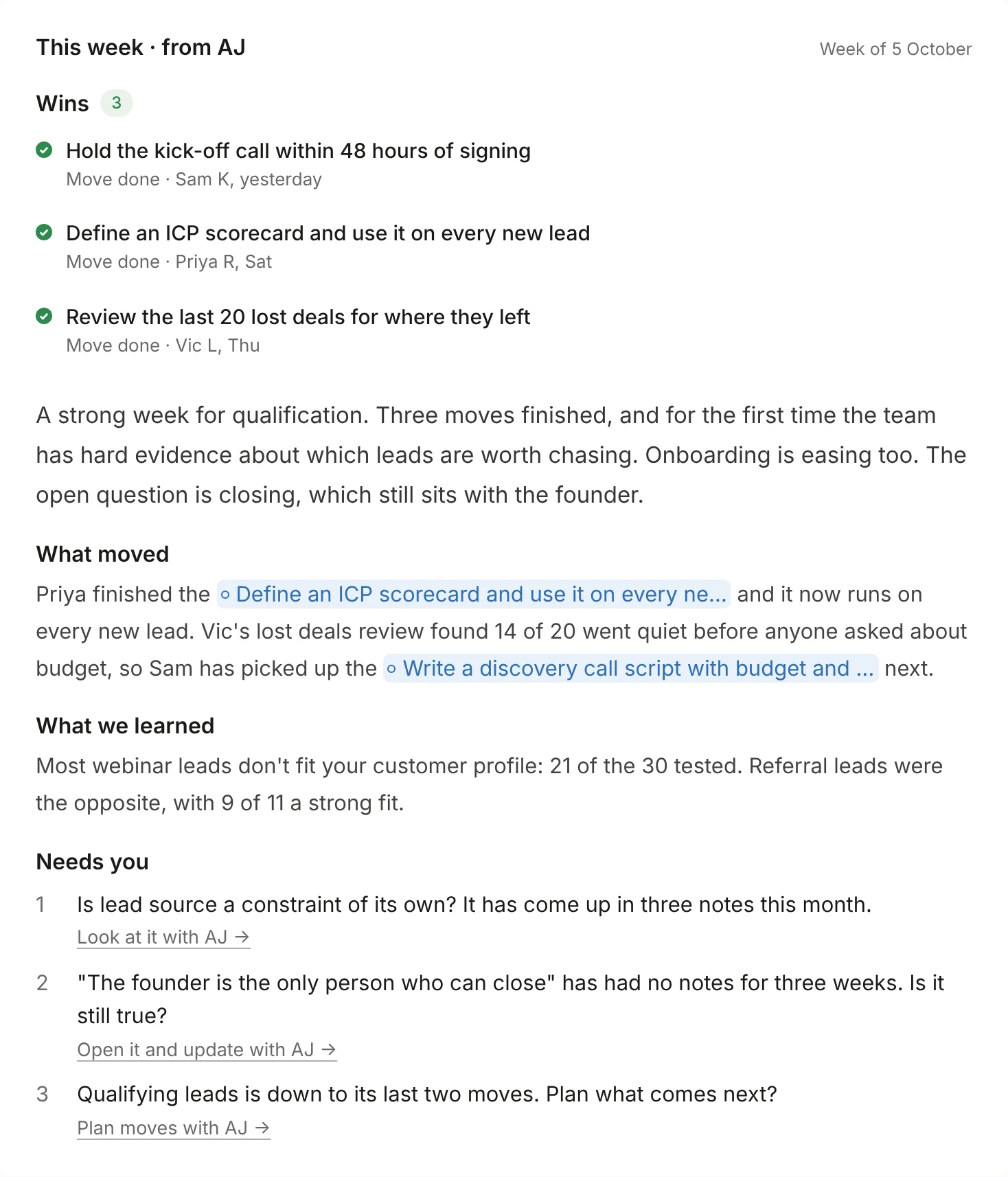
A weekly brief for the leadership team.
The wins, how it’s going and up to three things that need a decision, every Monday.
I built Clearahead because none of the goal tracking tools I’d used answered the question that mattered most to me as a founder, which was what’s actually holding this goal back. So every goal in Clearahead has its own workspace, with what you’re aiming for, why it matters, how you’ll know and where it stands today, and under it an ordered list of the constraints in the way and the moves that will clear each one, every move with an owner. You can run several workspaces at once, such as growth, a product launch and a raise, each with the right people behind it.
People update in their own words when the work moves, and AI keeps the picture current: it files each update against the right goal, constraint or move, keeps the facts as evidence, and every Monday writes a short brief for the leadership team with the wins, how it’s going and up to three things that need a decision. Your team still makes every call; Clearahead does the gathering and the writing up, so the weekly meeting can be about choices rather than status.
There are three roles. Architects, usually the founder, CEO or COO, set the goals and make the calls; Contributors, usually heads of department and their teams, own constraints and moves; and Viewers, such as the board, investors and advisers, follow every goal in real time at no extra cost. Clearahead deliberately doesn’t do task management, OKR scoring or performance reviews, so it sits alongside the tools you already use rather than replacing them. To see it working, start on the Clearahead homepage, watch the short video below, or read how it works.
One price for the whole company.
Free
£0
Up to 3 people and one workspace, with full access. No card needed, and Viewers are free.
Clearahead plan
£297 a month
Or £2,997 a year. Unlimited people and up to 10 workspaces, with no seats to count.
Questions.
What is a goal tracking tool?
A goal tracking tool is software a company uses to set its goals, track progress towards them and keep everyone aligned on what matters. Good ones also show what’s holding each goal back and who owns it, so a leadership team can decide what to do next rather than just seeing a score.
What is the best goal tracking tool?
It depends on the job. OKR software suits large companies coordinating many teams, operating system tools suit teams running EOS, and constraint-led tools such as Clearahead suit leadership teams of growing companies whose goals are clear but keep slipping. See the best goal tracking software for startup leadership teams for a full comparison.
Is a goal tracking tool the same as goal tracking software?
Yes, the terms are used interchangeably. This guide covers how to choose one; our goal tracking software page describes Clearahead itself.
What’s the difference between a goal tracking tool and a project management tool?
A project management tool tracks tasks and whether they’re done; a goal tracking tool tracks outcomes, how close the company is to each goal and what’s in the way. Most teams use both. Read the full comparison.
Is there a free goal tracking tool for teams?
Yes. Clearahead is free for up to three people and one workspace, with no card needed, and viewers such as investors are free on every plan. See the free options compared.
Do we need OKRs to use a goal tracking tool?
No. OKRs are one method among several. Many growing companies do better with one or two memorable goals, what’s holding each one back and a weekly review. Compare the methods.
How many goals should we track?
For most companies under about 200 people, one or two company goals that everyone can name, each with its own constraints and moves. More than that and they stop being priorities.
How often should we update and review goals?
Update when the work moves, in a sentence, rather than before meetings; review weekly and briefly with the leadership team, focusing on what moved, what’s stuck and what needs a decision.
How long does it take to set up a goal tracking tool?
With Clearahead, most teams set their first goal and constraints in an afternoon. A proper roll-out to the wider team takes about a month. See the four-week plan.
How much does Clearahead cost?
Free for up to three people and one workspace. The Clearahead plan is £297 a month or £2,997 a year ($397 or $3,997) for the whole company, with unlimited people and up to 10 workspaces. See pricing.
Every goal tracking tool guide.
- ComparisonTypes of goal tracking tool, compared
- ComparisonGoal tracking tool vs project management tool
- ComparisonGoal tracking tool vs spreadsheet: when to make the switch
- MethodsCommon goal tracking methods, and when each one works
- PitfallsEight goal tracking pitfalls, and how to avoid them
- Buyer’s checklistHow to choose a goal tracking tool: a checklist
- Free toolsFree goal tracking tools for teams: what you get, and when to pay
- How toHow to roll out a goal tracking tool so your team actually uses it
Goal tracking software → All comparisons → Read our thinking → Take the 60-second fit check →