
Your goal, what’s in the way and the moves to clear it, in one view.
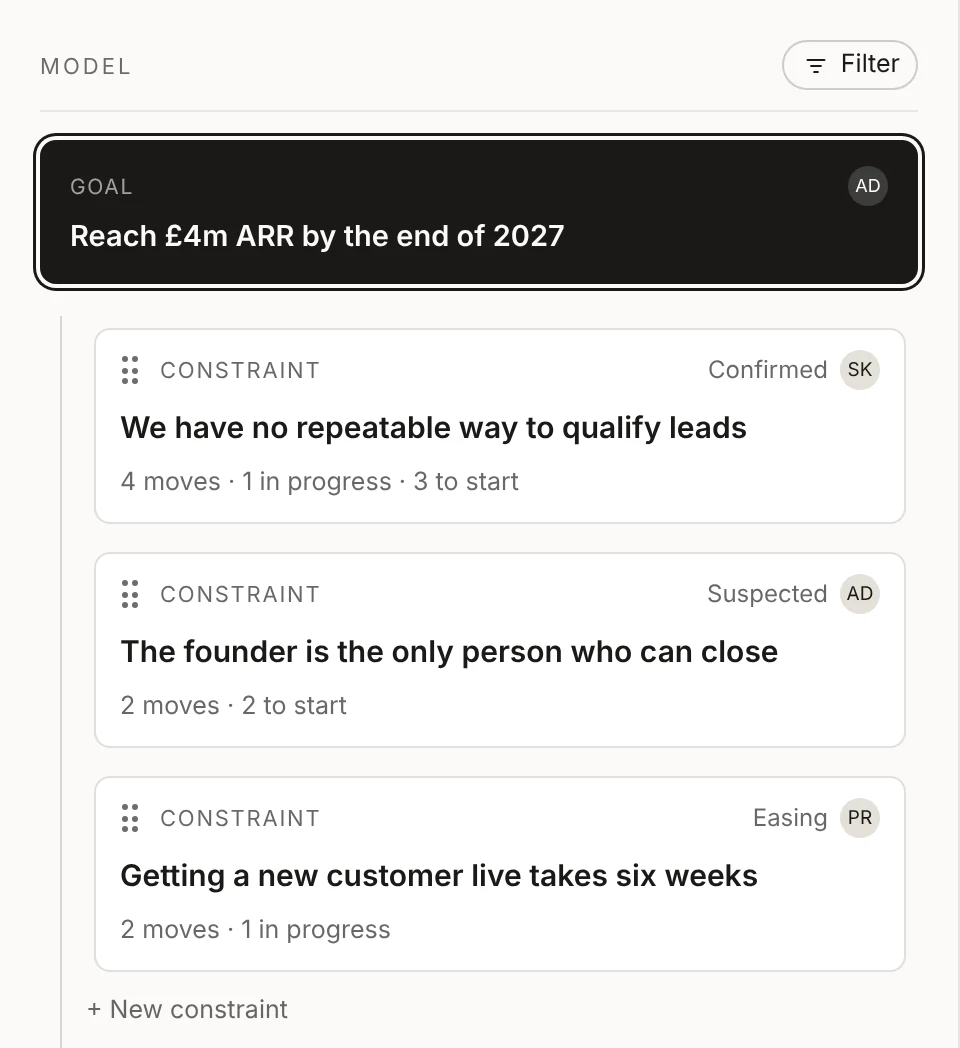
The model is the heart of Clearahead. Your goal sits at the top, the constraints holding it back sit underneath, and the moves your team is making against each one sit under those. Everyone sees the same picture, and AJ, the AI inside Clearahead, keeps it current.
Free for up to 3 people. No card needed.
How it works.
One goal at the top.
Every workspace has one goal, with a name simple enough that people remember it, like “Triple revenue within 24 months”. AJ helps you shape it, then writes up why it matters, why you believe it’s possible, where you are today and how you’ll know you’ve got there.
Working towards more than one thing? Give each goal its own workspace.
Constraints, not a to-do list.
Under the goal sit its constraints: the causes holding you back right now, not the symptoms you can see. Most goals have three to five at a time. Each one has an owner and a status, from suspected to confirmed to easing, so you can tell a hunch from something you know.
Constraints are one level deep on purpose. Symptoms belong as evidence on a constraint, not as constraints of their own. Drag them into the order you’ll tackle them.
Moves under each constraint.
Moves are the small, specific things you’ll do to ease a constraint, done in weeks, not quarters. Each has one owner and a due date, and sits in one of three groups: proposed and not started, in progress, or done and dropped.
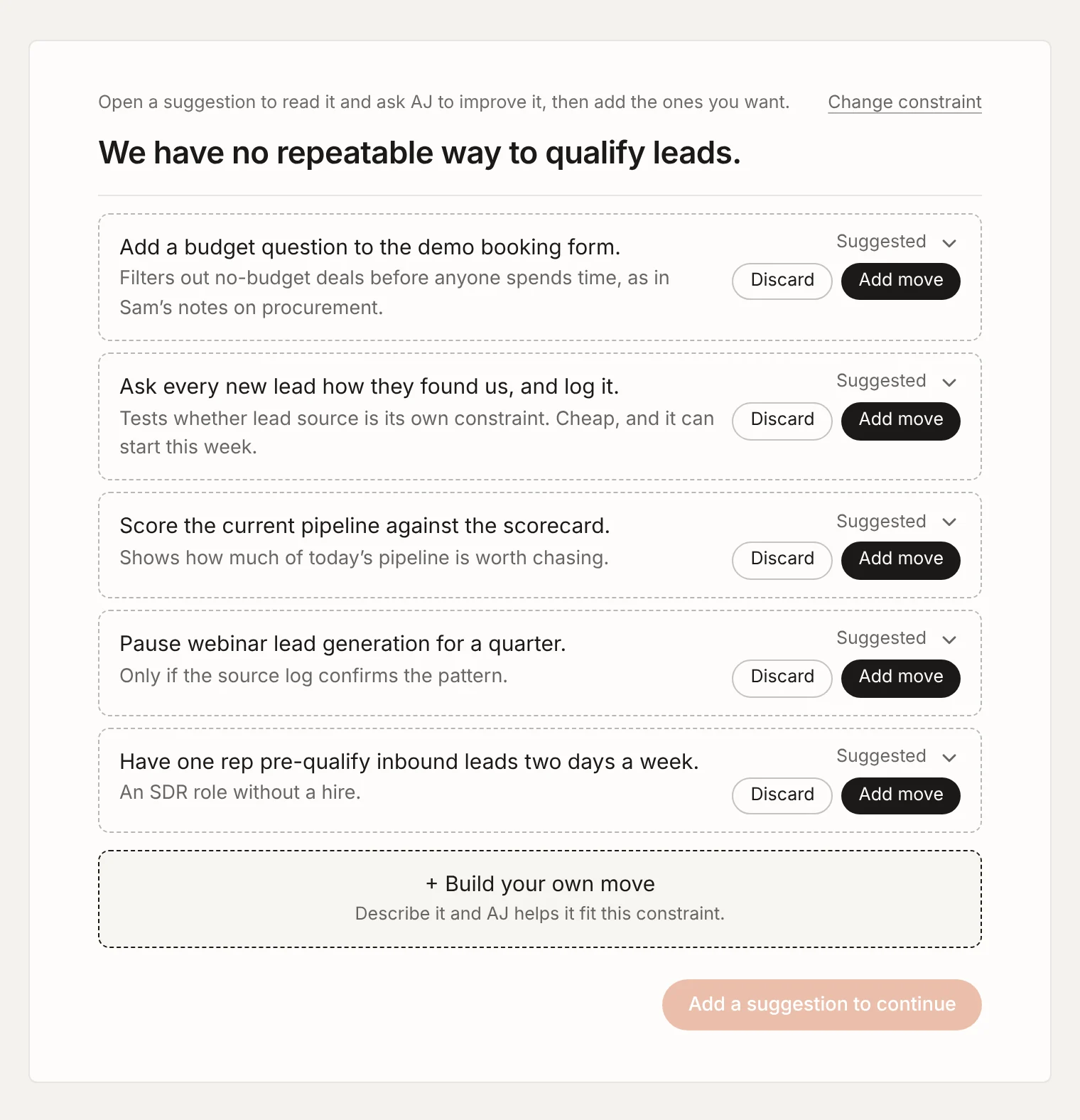
Click Plan next moves and AJ suggests moves in the order to tackle them, with its reasoning for each. Keep the ones you like, or build your own and AJ tells you how well it fits.
Room for everything else.
Work that moves the goal without sitting under a constraint goes in Other work. Things you might do one day go in Ideas, outside the model. Cleared constraints go to Completed, where AJ remembers how you cleared them, and anything you set aside goes to Archived.
Click anyone’s initials at the top of the model to see just their part of it. Click any item to open it in the context area beside the model.
What AJ does in the model.
-
Finds the real cause.
Describe what you’re seeing and AJ asks “why?” until you reach something you can fix.
-
Suggests the moves.
AJ suggests moves for each constraint, ranked, and explains why each one should help.
-
Keeps it current.
Tell AJ what happened in a sentence and it updates the right items, so the model never goes stale.
-
Answers from your plan.
Chat with AJ beside the model to ask what to focus on or where the evidence is weak. In chat AJ only reads; changes go through you.
Learn more in the docs.
Short how-to guides, most with a video.
- Docs Adding constraints Find the cause holding you back, not the symptom.
- Docs Planning moves Small, specific moves, each with an owner and a due date.
- Docs Ideas, Other work, Completed and Archived Where ideas live before they start, and where finished work goes.
- Docs Chatting with AJ Ask AJ anything about your plan.
Questions.
Why does each workspace have only one goal?
Because a team that chases one goal at a time gets there faster, and everyone knows which goal a constraint or move belongs to. If your company is working towards several things, give each its own workspace. The Clearahead plan includes up to 10.
How many constraints should we have?
Most goals have three to five at any one time. If you have many more, some are probably symptoms of the same cause, and AJ will help you find it.
Does the order of constraints matter?
Order shows your working priority, so the team can see what to tackle first. It doesn’t change how much weight AJ gives an item.
Can we see the model on a phone?
Yes. Clearahead works in your phone’s browser, with the model in its own tab. There’s nothing to download. See Clearahead on your phone.
Still have a question? Get in touch.
More features.
- Context area Every goal, constraint and move in detail, with where it stands and why.
- This week from AJ A short brief every Monday: the wins, what moved and what needs you.
- My work What needs you, what’s coming up and everything you own, in one list.
- Workspaces A workspace for each goal, team or department, up to 10 per organisation.
- Ideas Somewhere to keep ideas beside the model until someone starts one.
- Evidence The facts behind every item, saved from each update with who said it and when.
- Notifications One short summary email on the mornings you choose, not one per change.
Set your destination. Clearahead gets you there.
Free for up to 3 people. No card needed.