
Everything that needs you, in one list.
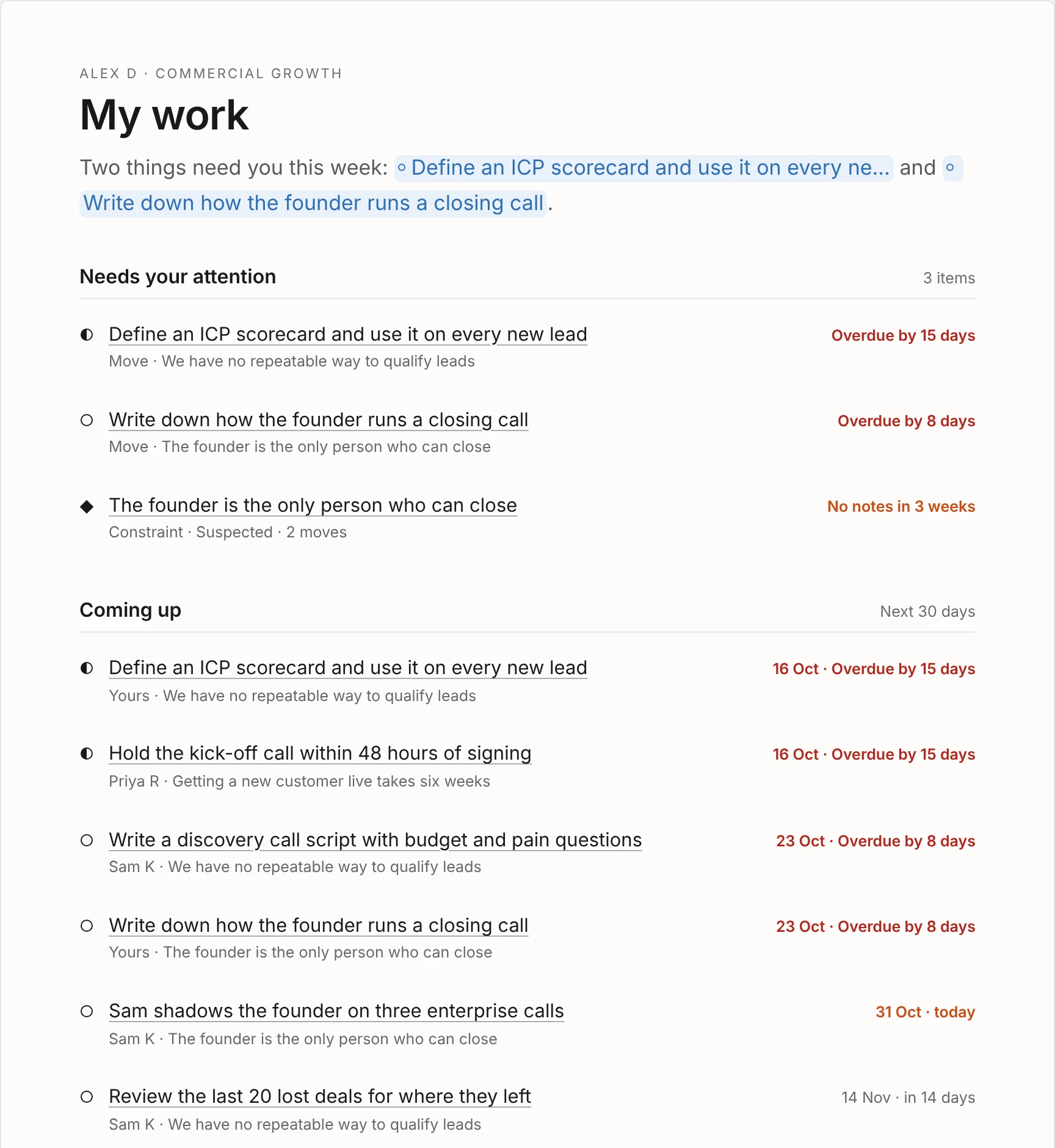
My work shows each person what’s theirs: what needs their attention, what’s coming up in the next 30 days and everything they own, with a short read from AJ at the top. Nobody has to hunt for their part of the plan, and nobody has to chase anyone for updates.
Free for up to 3 people. No card needed.
How it works.
Needs your attention.
The top of the list is what needs you now: your moves that are due within a week or overdue, your moves with no due date, constraints nobody owns yet, and your constraints that have no live moves or haven’t had an update in three weeks.
The badge on My work in the top bar shows how many things need you, so you know before you click.
Coming up, and everything you own.
Coming up lists every move in the workspace that’s overdue or due in the next 30 days, soonest first, with whose it is, so you can see what’s landing around you. Assigned to you lists every goal, constraint and move you own in the workspace. Click any of them to open it and update it with AJ.
Your recent insights.
At the foot of the page, AJ sums up the evidence you’ve shared in the last 30 days. Each insight links to the item it’s on and the part of the page it feeds, so you can see how what you said shaped the plan.
Built on owners and due dates.
Every move has one owner and a due date, and every constraint should have an owner. That’s what powers My work. When someone joins the team, anything with their name on it is already waiting in their list.
Change an owner or a date by clicking Update with AJ on the item and telling AJ who or when.
Why it keeps the plan moving.
-
Nothing drifts.
A move with no date or a constraint with no owner shows up straight away, so gaps get fixed.
-
Quiet work gets noticed.
A constraint with no update in three weeks is flagged to its owner before it goes stale.
-
One place to update.
Open an item from your list, tell AJ what happened, and the whole team’s view updates.
-
A read from AJ.
A short summary at the top of the page says what matters most in your list right now.
Learn more in the docs.
Short how-to guides, most with a video.
Questions.
How does Clearahead know what needs me?
It looks at what you own. Moves due within a week or overdue, moves with no due date, constraints with no owner, and your constraints with no live moves or no update in three weeks all count as needing your attention.
Is My work for one workspace or all of them?
My work shows what’s yours in the workspace you’re in. Switch workspace from the top left to see your list there. Your summary email covers every workspace you’re in.
Will I get emails about my work?
You get one short summary email on the mornings you choose, covering things you own and the big changes in your workspaces. Not one email per change.
Still have a question? Get in touch.
More features.
- The model Your goal, what’s holding it back and the moves to clear it, in one view.
- Context area Every goal, constraint and move in detail, with where it stands and why.
- This week from AJ A short brief every Monday: the wins, what moved and what needs you.
- Workspaces A workspace for each goal, team or department, up to 10 per organisation.
- Ideas Somewhere to keep ideas beside the model until someone starts one.
- Evidence The facts behind every item, saved from each update with who said it and when.
- Notifications One short summary email on the mornings you choose, not one per change.
Set your destination. Clearahead gets you there.
Free for up to 3 people. No card needed.