
Every goal, constraint and move, with the reasons behind it.
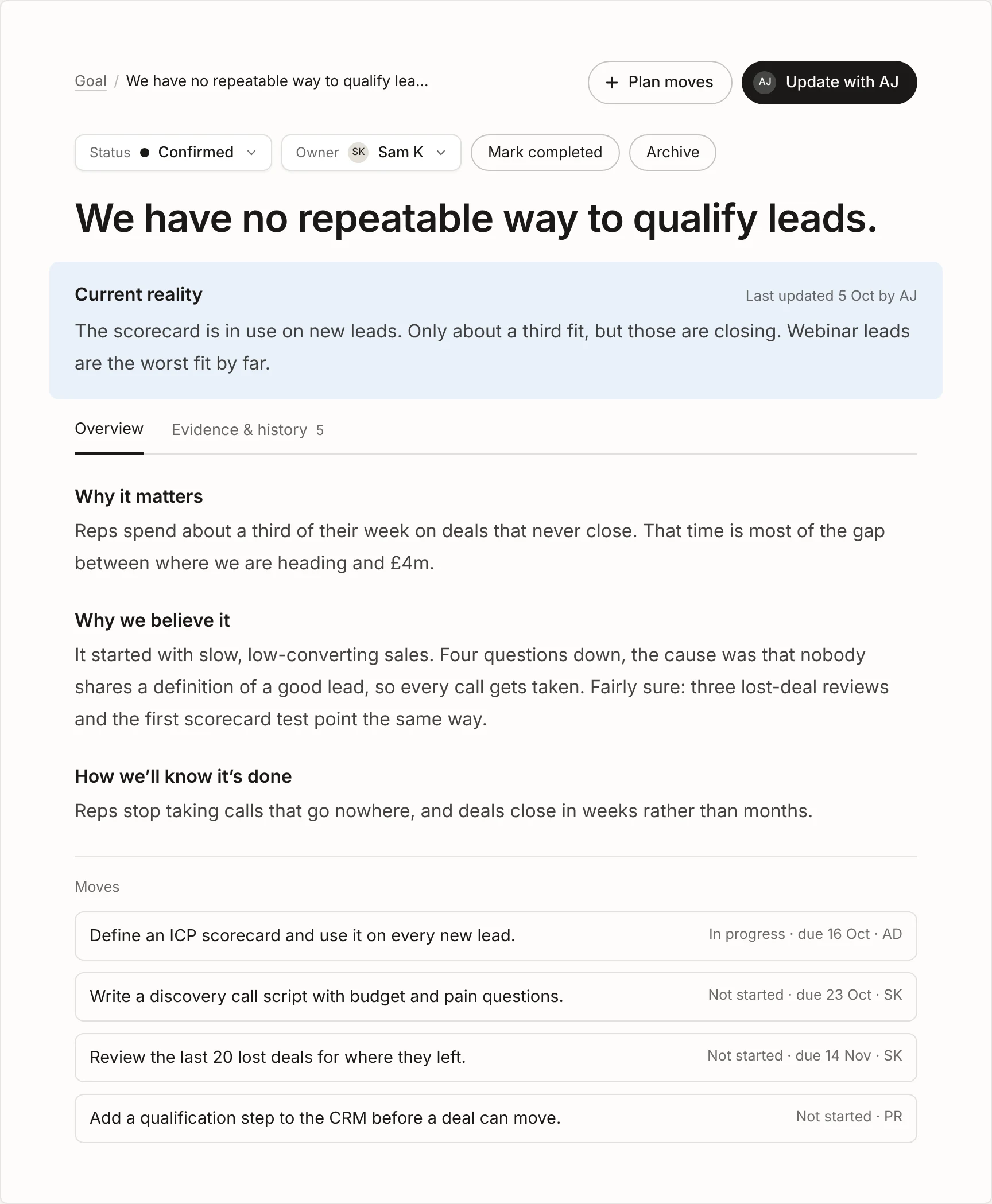
Click anything in the model and it opens in the context area, the main panel of the screen. It shows where the item stands today, why it matters, why you believe it and how you’ll know it’s done, so nobody has to ask for the backstory.
Free for up to 3 people. No card needed.

How it works.
Current reality, right under the title.
The first thing you see on any item is its current reality: where things stand today, when it was last updated and who by. AJ rewrites it whenever someone tells it what’s changed, so it’s never a week out of date.
When AJ thinks a move is done or a constraint has cleared, it says so at the foot of the panel. You decide whether it’s right.
The same questions on every item.
Goals, constraints and moves all answer the same questions: why it matters, why we believe it and how we’ll know it’s done. Anyone can pick up any item and understand it in a minute, without a handover.
A constraint’s page lists its moves, with their status, owner and due date. The goal’s page opens with This week from AJ.
Change it by talking, not typing.
Fields can’t be typed into directly. Click Update with AJ, say what happened in plain words, and AJ rewrites the right fields while you watch. Undo anything you don’t like before you save.
Going through AJ means every change is captured as evidence and history, with who said it and when.
Look back whenever you need to.
The Evidence and history tab shows the facts behind the item and every change made to it. Past versions lets you step back through what it said before and who changed it, and restore an earlier version if you need to.
What AJ does in the context area.
-
Writes it up.
Talk AJ through a goal or constraint and it writes up every section for you to check.
-
Rewrites as things change.
Each update rewrites the current reality and the sections it touches, nothing else.
-
Suggests a status.
AJ may suggest a move is in progress or done, or that a constraint is easing. You accept it or not.
-
Asks the follow-up.
When a move lands, AJ asks whether it changes what you believe about the constraint above it.
Learn more in the docs.
Short how-to guides, most with a video.
- Docs Keeping it up to date Tell AJ what happened and the plan stays true.
- Docs Getting started Set up your organisation and shape your goal with AJ.
- Docs Ideas, Other work, Completed and Archived Where ideas live before they start, and where finished work goes.
- Docs Glossary Short definitions of every term in Clearahead.
Questions.
Why can’t I type into the fields myself?
So that every change is recorded. When updates go through AJ, what you said is kept as evidence, with who said it and when, and the history stays complete. It’s also quicker: one sentence can update several fields at once.
Who can update an item?
Architects shape the goal and the constraints. Contributors update constraints and moves and add new moves. Viewers can read everything, chat with AJ and log ideas, but can’t change the plan.
Can we restore an earlier version?
Yes. Open the item, step back through Past versions and restore the one you want. Evidence isn’t changed by a restore.
Still have a question? Get in touch.
More features.
- The model Your goal, what’s holding it back and the moves to clear it, in one view.
- This week from AJ A short brief every Monday: the wins, what moved and what needs you.
- My work What needs you, what’s coming up and everything you own, in one list.
- Workspaces A workspace for each goal, team or department, up to 10 per organisation.
- Ideas Somewhere to keep ideas beside the model until someone starts one.
- Evidence The facts behind every item, saved from each update with who said it and when.
- Notifications One short summary email on the mornings you choose, not one per change.
Set your destination. Clearahead gets you there.
Free for up to 3 people. No card needed.